
Browser picker
A Mac link router that knows your browser profiles
macOS gives you one default browser and sends every link to it. A link router puts itself in between and decides where each link actually belongs: which browser, and which profile. Burly is a free, native one that asks you in a keystroke, rather than making you write rules.
By Matt Senter, who builds Burly
Matt Senter is an independent Mac developer who designs, builds, and ships small native apps end to end. He built Burly to send every link on his own Mac to the right browser profile, including Safari profiles that other routers cannot reach, and he writes these pages from that first-hand use.
Updated
What does a link router actually do?
Every link you click, in Mail, Slack, Messages, Notion, or the Terminal, is handed to whichever app macOS has registered as the handler for http and https. Normally that is a browser. A link router registers itself as that handler instead, so the link lands with it first. It then does the one thing a browser cannot: it works out where the link should go, and passes it on.
The category goes by several names, which is why it is hard to search for. Browser picker, browser chooser, browser switcher, and link router all describe the same job. The difference between the apps is when they ask. A picker asks at the moment you click. A rules-based router decides for you from the link, the app you clicked it in, or a pattern you wrote down earlier.
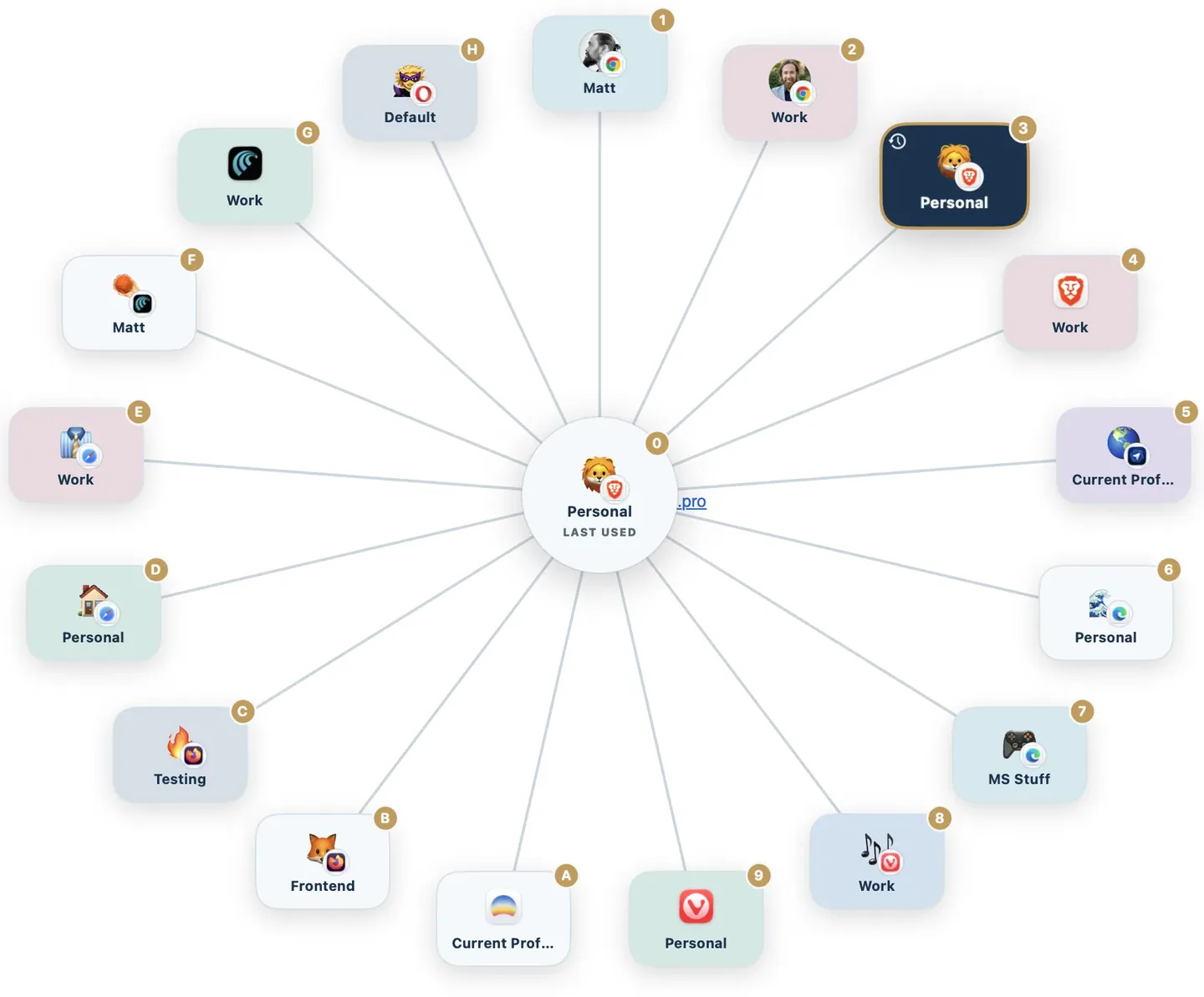
Why does the profile matter more than the browser?
Most people who want a picker do not really have a browser problem. They have a profile problem. Work lives in one Chrome profile and personal life in another, or a client sits in its own Safari profile, and the cost of a link landing in the wrong one is not cosmetic: you are signed into the wrong Google account, the wrong calendar, the wrong tenant, and you copy the URL and paste it somewhere else to try again.
A picker that only lists browsers cannot help with that. It sends the link to Chrome and Chrome opens it in whatever profile happens to be frontmost. Burly lists profiles rather than browsers, so Safari Work and Safari Personal are two separate destinations, each with its own key. It reads them from the browsers themselves and keeps up as you add, rename, or remove them.
Safari is the sharp edge here. Chromium and Firefox profiles can be targeted from the command line, so several apps manage it, but Safari has no public way to open a link in a chosen profile. Burly supports Safari profiles along with every Chromium and Firefox browser it finds. The Safari profile switcher page is the dedicated write-up of that path.
How do you set up a browser picker on a Mac?
Five minutes, most of which is deciding on emoji. Nothing here is irreversible: setting a different default browser in System Settings puts everything back exactly as it was.
- Download Burly and drag it to your Applications folder. It runs as a menu bar app, so there is no Dock icon and no window to manage.
- Open it once. Burly scans the browsers already installed on your Mac and reads their profiles, so there is no list to build by hand.
- Open System Settings, go to Desktop & Dock, and set Burly as your default web browser. This is the step that puts it in the path of every link.
- Give each profile an emoji or account photo, a color, and a shortcut key, so the picker becomes something you read at a glance rather than something you scan.
- Pick a bypass modifier and decide what it opens. Holding it as you click sends the link straight through without the picker appearing at all, either to your last-used profile or to one profile you pin, and inverting the gesture makes that what a plain click does instead.
If you are not sure how to change the default handler, the default browser guide walks through the System Settings steps with screenshots.
Picker or rules? Pick the right side of the line
This is the choice that decides whether you keep whatever you install. If your routing is predictable, every Jira link to work Chrome, every link from Slack to the same place, a rules-based router will do it silently and you will never see a prompt. If your routing depends on what you are doing at the time, rules turn into a list you maintain forever, and a picker that asks is faster than a rule that guesses wrong.
Burly is squarely on the picker side, with no rules engine at all. That is a deliberate limit, not an oversight, and it is the reason some people should use something else. If you want a ranked read on the whole category, the best browser picker for Mac roundup says who each one is for, and the comparison hub puts price, profile support, and picker style for every app in one table.
Browser picker FAQ
- What is a browser picker?
- A browser picker is a small app that becomes your default browser without being a browser. When you click a link anywhere on your Mac, it intercepts the link and asks where it should open, then hands the link to the browser, or browser profile, you choose. It is also called a link router, a browser chooser, or a browser switcher.
- Does macOS have a built-in browser picker?
- No. macOS lets you nominate exactly one default web browser in System Settings, under Desktop & Dock, and every link goes there. There is no built-in way to send one link to Safari and the next to Chrome, and no way at all to aim a link at a particular profile inside a browser. That gap is what a picker fills.
- Is there a free browser picker for macOS?
- Yes. Burly is free, native, and needs no configuration. Finicky is free and open source but replaces the picker with a JavaScript config file. Browserosaurus was the other well-known free picker, but it was retired in 2025 and no longer gets updates.
- Can a browser picker open a specific browser profile?
- Some can. Most pickers stop at the browser, so they can send a link to Chrome but not to your work profile inside Chrome. Burly treats each profile as its own destination, Safari profiles included, and discovers them automatically as you add and rename them.
- Will a browser picker slow down opening links?
- It should not. Burly runs as a resident menu bar app, so the picker is already in memory when a link arrives and appears under your cursor immediately. Pressing the profile key, or holding your bypass modifier as you click, skips the picker entirely and goes straight to the browser.
- Does a browser picker see the links I click?
- It has to, in order to route them, so where that link goes next is the question worth asking. Burly resolves everything on your Mac: no account, no server, no analytics on your URLs, and nothing about a link ever leaves the device.
Try the picker
Free, native, and private. Every browser profile on your Mac, one keystroke away.
Download for macOS