
Comparisons
How Burly compares
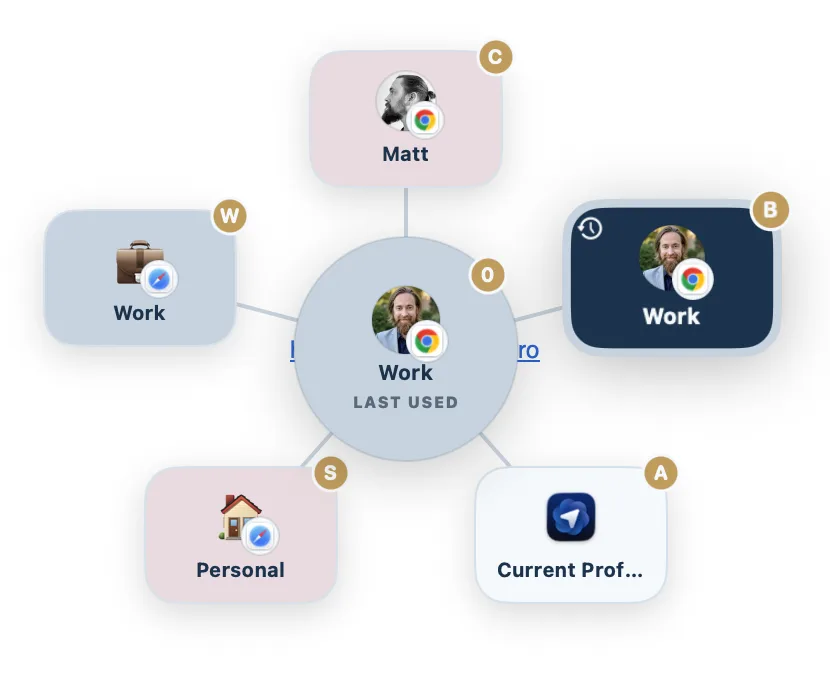
Plenty of macOS apps route links. Most pick a browser, charge for it, or hide behind a config file. Burly is free, native, and built around one idea: your browser profiles, Safari profiles included, are the destination. Here is an honest look at how it stacks up.
By Matt Senter, who builds Burly
Matt Senter is an independent Mac developer who designs, builds, and ships small native apps end to end. He built Burly to send every link on his own Mac to the right browser profile, including Safari profiles, which most routers cannot reach, and he writes these pages from that first-hand use.
Updated
Every macOS link router at a glance
The four things that usually decide it. Full detail, including where each app beats Burly, is on the individual comparisons below.
| App | Price | Browser profiles | Safari profiles | Picker |
|---|---|---|---|---|
| Burly | Free | ✓ | ✓ | Radial, under the cursor |
| VeljaVelja site ↗ | $10 one-time | Chromium and Firefox | ✗ | List popup |
| ChoosyChoosy site ↗ | $10 one-time | Chromium only | ✗ | Menu or list |
| FinickyFinicky site ↗ | Free | Chrome and Firefox | ✗ | No picker (config only) |
| BrowserosaurusBrowserosaurus site ↗ | Free | ✗ | ✗ | Grid popup |
| BumprBumpr site ↗ | $2.99 one-time | ✗ | ✗ | Popup under the cursor |
| OpenInOpenIn site ↗ | $11.99 one-time | ✓ | ✓ | Selection dialog |
| BrowserFairyBrowserFairy site ↗ | Free; Pro $8.99/yr | Chromium and Firefox, Pro only | ✗ | Keyboard launcher panel |
| Open Link ProOpen Link Pro site ↗ | Free; Pro $19.99 lifetime | Browsers only (no profiles listed) | No profiles listed | Number-key picker |
How to choose one
Almost every choice here comes down to one question: do you want to decide where a link goes at the moment you click it, or do you want to write rules once and never think about it again? Velja, Choosy, Finicky, and OpenIn are built for the second answer. Burly, Browserosaurus, and Bumpr are built for the first. Neither is better, and picking the wrong side of that line is the most common reason people end up replacing whatever they installed.
The second question is how far down the app needs to reach. Bumpr and Browserosaurus stop at the browser: they can send a link to Chrome, but not to your work profile inside Chrome. Velja, Choosy, and Finicky reach Chromium and Firefox profiles but cannot target a Safari profile. Of the apps compared here, only Burly and OpenIn reach every profile, Safari included, so if your work life lives in a Safari profile the field narrows to two immediately.
Price sorts the rest. Finicky and Browserosaurus are free but ask for a config file or are no longer maintained. Burly is free and needs neither. If you want rules, native-app routing, or link types beyond the web, the paid apps genuinely earn their money, and each comparison below says exactly where.
If the category itself is new to you, the Mac link router guide explains what these apps do, why macOS needs one, and how to set one up before you start comparing prices.
The full comparisons
Burly vs. Velja
$10 one-timeA polished $10 router from Sindre Sorhus, built around per-host and per-app rules.
Burly vs. Choosy
$10 one-timeThe deepest rules engine of the bunch, at $10, with Share menu, Handoff, and AirDrop routing.
Burly vs. Finicky
Free, open sourceFree and open source, driven by a JavaScript config file rather than a picker.
Burly vs. Browserosaurus
Free, open sourceA free, open-source browser picker that was retired in 2025 and is no longer maintained.
Burly vs. Bumpr
$2.99 one-timeA $2.99 picker that chooses between browsers and mail clients, but not between profiles.
Burly vs. OpenIn
$11.99 one-timeAn $11.99 route-everything utility covering links, mail, files, and phone numbers.
Burly vs. BrowserFairy
Free; Pro $8.99/yrA rules-first launcher with Chromium and Firefox profiles on Pro, and no Safari profiles.
Burly vs. Open Link Pro
Free; Pro $19.99 lifetimeA paid browser picker with regex rules, tracker stripping, and link history, but no profiles listed.
See it for yourself
Free, native, and private. Signed and notarized by Apple, and no account required.
Download for macOS