
Burly vs. Velja
The free Velja alternative that targets Safari profiles
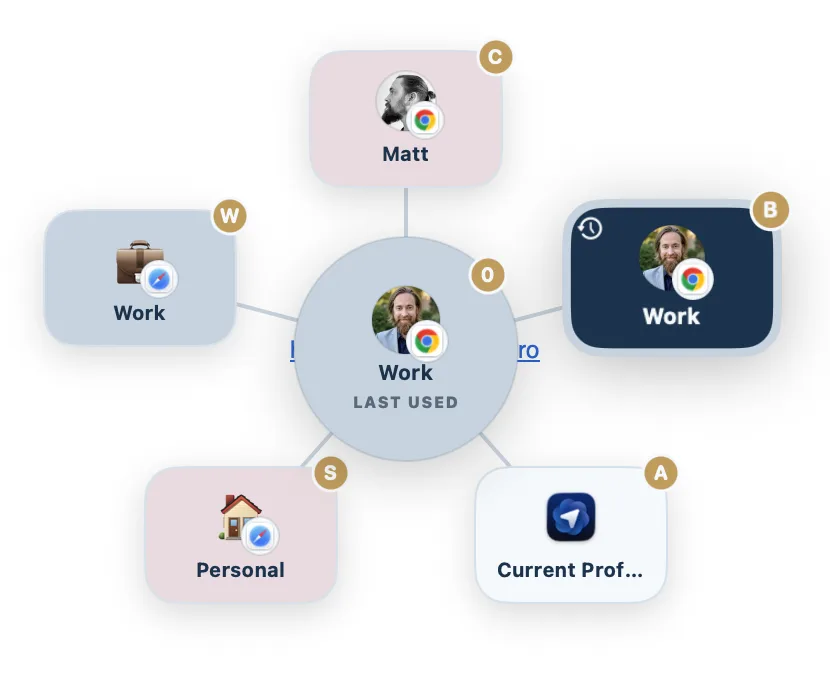
Velja is a great $10 router. If you want the same profile aware link routing for free, with Safari profiles as real destinations and a picker that blooms under your cursor, Burly is the alternative to try.
Download for MacBy Matt Senter, who builds Burly
Matt Senter is an independent Mac developer who designs, builds, and ships small native apps end to end. He built Burly to send every link on his own Mac to the right browser profile, including Safari profiles, which most routers cannot reach, and he writes these pages from that first-hand use.
Velja and its closest alternatives at a glance
| App | Price | Browser profiles | Safari profiles | Picker |
|---|---|---|---|---|
| Burly | Free | ✓ | ✓ | Radial, under the cursor |
| VeljaVelja site ↗ | $10 one-time | Chromium and Firefox | ✗ | List popup |
| ChoosyChoosy site ↗ | $10 one-time | Chromium only | ✗ | Menu or list |
| FinickyFinicky site ↗ | Free | Chrome and Firefox | ✗ | No picker (config only) |
| OpenInOpenIn site ↗ | $11.99 one-time | ✓ | ✓ | Selection dialog |
Why people switch from Velja
People shopping for a Velja alternative almost always arrive for one of two reasons. The first is the $10: Velja is fairly priced, but link routing feels like something the OS should do, and paying for it grates. The second is Safari. Velja routes to Chromium and Firefox profiles but cannot target a Safari profile, so if your work life lives in a Safari profile, Velja simply cannot reach it. Burly is free and treats Safari profiles as first-class destinations, which is why most switchers land here.
Is Burly a good Velja alternative?
If you are shopping for a Velja alternative, the question is usually one of two things: you want the same profile-aware routing without the $10, or you need to reach Safari profiles that Velja cannot target. Burly answers both. It is free, it discovers your profiles automatically, and Safari profiles are first-class destinations. What you give up is Velja's rules engine and its ability to route links into native apps, so weigh how much of your routing you want to happen automatically versus at click time.
How to switch from Velja to Burly
- Download Burly and drag it to Applications.
- Open System Settings, then Desktop & Dock, and set Burly as your default web browser. This replaces Velja as the handler; you do not need to uninstall Velja first.
- Burly reads your installed browsers and their profiles automatically. There are no rules to port over, because there are no rules.
- Optionally give each profile an emoji, a color, and a keyboard key so the picker becomes muscle memory.
What you give up
Be honest with yourself about automation before you switch. Velja's rules route each link silently by host or by the app it came from, so Slack links can land in one browser and Mail links in another with no picker at all. Burly can skip the picker too, but only one way: pin a single profile under What to open, turn on Invert, and every link goes straight there until you hold a key to choose. It has no per-host or per-app rules. You will also lose Velja's native-app routing, so Zoom links stop opening in Zoom, and its tracking-parameter stripping. If most of your routing already happens by rule and you like it that way, Velja is the better tool and this is not a switch worth making.
Velja is a polished, well loved browser picker by Sindre Sorhus. It routes links to the right browser, profile, or native app using rules you set per host or per source app, and it can strip tracking parameters from URLs on the way. It costs $10 as a one time purchase, with a free trial.
Burly vs. Velja: the quick take
The quick take: Velja wins on automation (per-host and per-app rules, native-app routing, tracking-parameter stripping) and is worth its $10 if you want links to route silently. Burly wins on price, on its radial picker, on per-profile hotkeys, and on reaching Safari profiles. If you would rather choose at click time than maintain rules, Burly is the better fit; if you want set-and-forget routing, Velja is.
Burly vs. Velja, feature by feature
| Feature | Burly | Velja |
|---|---|---|
| Price | Free | $10 one-time |
| Opens links in a specific browser profile | ✓ | Chromium and Firefox |
| Targets Safari profiles | ✓ | ✗ |
| Picker at your cursor | Radial, under the cursor | List popup |
| Per-profile keyboard shortcuts | ✓ | Letter keys in the prompt |
| Global hotkey to open a profile (no link needed) | ✓ | ✗ |
| Per-profile emoji, account photo, and color | ✓ | ✗ |
| Per-URL and per-source-app rules | ✗ | ✓ |
| Opens links in native apps, not just browsers | ✗ | ✓ |
| Strips tracking parameters from URLs | ✗ | ✓ |
| Fully local, no account | ✓ | ✓ |
| Native macOS app | ✓ | ✓ |
Features checked against the Velja site as of September 2026 (latest version 3.2.4, checked on October 4, 2026). Velja lists at $10 one-time on the Mac App Store (2026-10-24).
Where Velja is the better pick
- Velja routes to more than browsers. It can send a link straight to a matching native app, like opening a Zoom link in Zoom instead of the web.
- It has a real rules engine: open links from a given app or host in a chosen browser automatically, with no picker in the way.
- It strips tracking parameters from URLs, a privacy touch Burly does not do.
- At $10 it is a mature, frequently updated app from a developer with a long track record.
The verdict
If you want rule based automation, native app routing, or tracking parameter cleanup, Velja is well worth its $10. Choose Burly if you would rather have a free, picker first tool that treats every profile, Safari profiles included, as a first class destination, with a radial picker, per-profile keys, and a global hotkey to jump into any profile without a link.
Other Velja alternatives
Burly is not the only option, and if you are searching for Velja alternatives in the plural you probably want to see the field before you commit. Choosy is the closest like-for-like swap: another paid, polished rules engine, with deeper matching than Velja and the same Safari blind spot. Finicky is the free answer if you are happy writing your routing as JavaScript instead of clicking it. OpenIn is the one to look at if you want Velja's automation plus mail, file, and phone-number routing, and it reaches Safari profiles too. Bumpr is the cheap picker if you only ever switch whole browsers. Here is the shortlist.
- Choosy · $10 one-time
The deepest rules engine of the bunch, at $10, with Share menu, Handoff, and AirDrop routing. - Finicky · Free, open source
Free and open source, driven by a JavaScript config file rather than a picker. - Browserosaurus · Free, open source
A free, open-source browser picker that was retired in 2025 and is no longer maintained. - Bumpr · $2.99 one-time
A $2.99 picker that chooses between browsers and mail clients, but not between profiles. - OpenIn · $11.99 one-time
An $11.99 route-everything utility covering links, mail, files, and phone numbers. - BrowserFairy · Free; Pro $8.99/yr
A rules-first launcher with Chromium and Firefox profiles on Pro, and no Safari profiles. - Open Link Pro · Free; Pro $19.99 lifetime
A paid browser picker with regex rules, tracker stripping, and link history, but no profiles listed.
Want them side by side instead? The comparison hub puts every macOS link router in one table, and the Mac link router guide explains what these apps do and how to set one up.
Velja alternatives: common questions
- Is there a free Velja alternative?
- Two, with different shapes. Burly is free, needs no configuration, and shows a radial picker at your cursor. Finicky is free and open source but has no picker: you describe your routing in a JavaScript config file. Browserosaurus used to be the third free option, but it was retired in 2025 and is no longer maintained.
- Can Velja open links in a specific Safari profile?
- No. Velja routes to Chromium and Firefox profiles, but Safari profiles are not available as destinations. Of the routers compared on this site, only Burly and OpenIn can send a link to a chosen Safari profile.
- Why does Burly ask for Accessibility permission when Velja does not?
- Because Burly can open a link in a Safari profile and Velja cannot. Safari has no public way to launch a named profile, so Burly presses Safari's own New <Profile> Window menu item through the Accessibility API, and macOS only allows that with your permission. Chrome, Edge, Brave, and Firefox profiles do not need it: both apps just ask once for access to the data where those browsers keep their profile list. If you never use Safari profiles, you can leave Accessibility off and Burly still works.
- Do I have to uninstall Velja before trying Burly?
- No. macOS routes links to whichever app is set as your default web browser, so setting Burly as the default in System Settings, under Desktop & Dock, is enough to take Velja out of the path. Velja stays installed and unchanged, and switching the default back restores it.
Try Burly free
Native, private, and free. Route every link to the right browser profile in seconds. No account required.
Download for macOS