
Burly vs. Open Link Pro
An Open Link Pro alternative that opens the exact browser profile
Open Link Pro chooses the browser, and cleans the link on the way. If you need the link to land in a specific profile, Work Chrome versus Personal Chrome, or a Safari profile, Burly is the free alternative to try.
By Matt Senter, who builds Burly
Matt Senter is an independent Mac developer who designs, builds, and ships small native apps end to end. He built Burly to send every link on his own Mac to the right browser profile, including Safari profiles that other routers cannot reach, and he writes these pages from that first-hand use.
Open Link Pro and its closest alternatives at a glance
| App | Price | Browser profiles | Safari profiles | Picker |
|---|---|---|---|---|
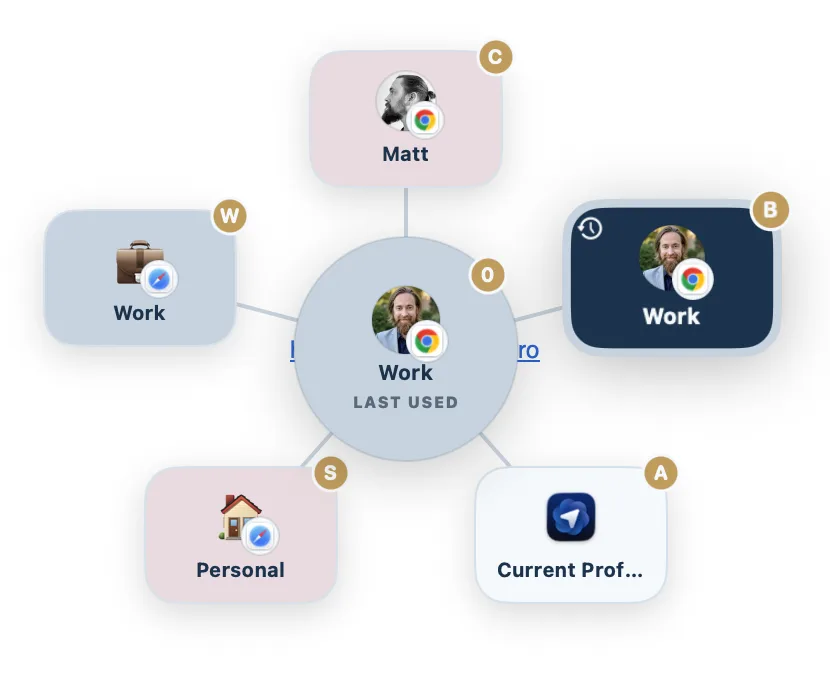
| Burly | Free | ✓ | ✓ | Radial, under the cursor |
| Open Link ProOpen Link Pro site ↗ | Free; Pro $19.99 lifetime | Browsers only (no profiles listed) | No profiles listed | Number-key picker |
| VeljaVelja site ↗ | $8 one-time | Chromium and Firefox | ✗ | List popup |
| OpenInOpenIn site ↗ | $11.99 one-time | ✓ | ✓ | Selection dialog |
| BumprBumpr site ↗ | $2.99 one-time | ✗ | ✗ | Popup under the cursor |
Why people switch from Open Link Pro
People move on from Open Link Pro when they realise the question they needed answered was not "which browser" but "which profile". Its picker and rules choose between Safari, Chrome, Firefox, Edge, Brave, and Opera, and nothing in its listing reaches the profiles inside them. Price is the other nudge: the useful features sit behind a $14.99 yearly subscription or a $19.99 lifetime license. Burly costs nothing and routes to the profile itself.
Is Burly a good Open Link Pro alternative?
Open Link Pro is a broad utility, and the usual reason to look past it is depth rather than breadth. It decides which browser opens a link, and its listing never mentions profiles, so Chrome is as far as it goes. If one browser holds two lives, a work profile and a personal one, that is the gap. Burly is free, discovers every profile automatically, and treats Safari profiles as destinations. You would give up Open Link Pro's tracker stripping, AMP skipping, regex rules, and link history.
How to switch from Open Link Pro to Burly
- Download Burly and drag it to Applications.
- Set Burly as your default web browser in System Settings, under Desktop & Dock.
- Burly lists every profile in every installed browser, the level Open Link Pro's picker does not show.
- If you relied on Open Link Pro to strip tracking parameters, keep a cleaning extension in each browser, because Burly passes links through unchanged.
What you give up
Open Link Pro does several things Burly does not do at all. It removes tracking parameters and AMP wrappers before a page loads, routes by regex or keyword without asking, opens Zoom and Slack links in their apps, and keeps a searchable history of links you opened. If those are the reason you bought it, you will miss them, and running Burly means handing those jobs to other tools.
Open Link Pro, listed on the Mac App Store as Open Link for Chrome & Firefox, is a feature-dense browser picker by Cristian Gav. It sits in the menu bar, offers a number-key picker, and routes by website, keyword, source app, or regex. It also strips more than 70 tracking parameters, skips AMP pages, sends Zoom, Slack, Figma, and Spotify links to their apps, keeps a searchable link history, and ships a Safari extension. Its listing names browsers, not profiles. It is a free download, with Pro at $14.99 a year or $19.99 for a lifetime license.
Burly vs. Open Link Pro: the quick take
The quick take: Open Link Pro is the pick if you want a browser picker that also cleans tracking parameters, routes by regex, and remembers every link you opened. Burly is the pick if the job is getting links into the right profile, Safari profiles included, and you want it free with nothing to configure.
Burly vs. Open Link Pro, feature by feature
| Feature | Burly | Open Link Pro |
|---|---|---|
| Price | Free | Free; Pro $19.99 lifetime |
| Opens links in a specific browser profile | ✓ | Browsers only (no profiles listed) |
| Targets Safari profiles | ✓ | No profiles listed |
| Picker at your cursor | Radial, under the cursor | Number-key picker |
| Rules by website, keyword, source app, or regex | ✗ | ✓ |
| Strips tracking parameters and skips AMP | ✗ | ✓ |
| Opens Zoom, Slack, and Figma links in their apps | ✗ | ✓ |
| Searchable link history | ✗ | ✓ |
| Per-profile keyboard shortcuts | ✓ | Per-browser shortcuts |
| Global hotkey to open a profile (no link needed) | ✓ | ✗ |
| Per-profile emoji, account photo, and color | ✓ | ✗ |
Features checked against the Open Link Pro site as of September 2026. Open Link Pro lists at Free; Pro $19.99 lifetime on the Mac App Store.
Where Open Link Pro is the better pick
- Open Link Pro strips more than 70 tracking parameters, including utm, fbclid, and gclid, and skips AMP pages before they load.
- Its rules match by website, keyword, source app, or regex, so routine links route without a prompt.
- It keeps a searchable history of opened links and ships a Safari extension for sending the current page elsewhere.
The verdict
Open Link Pro is a good buy if you want one app that picks the browser, cleans the link, and remembers it, and you never need a particular profile. Burly is the free choice when the profile is what matters: it sends each link to Work or Personal inside the browser, Safari profiles included, through a radial picker with per-profile keys.
Other Open Link Pro alternatives
If you are looking at Open Link Pro alternatives in the plural, sort them by whether you need profiles. Velja ($8) is the closest match in spirit, with rules, native-app routing, and tracking-parameter stripping, and it adds Chromium and Firefox profiles. OpenIn ($11.99) goes further still, with regex rewriting and Safari profiles. Bumpr ($2.99) is the simple, cheap browser picker. Burly is the free one that routes to profiles, Safari included. Here is the shortlist.
- Velja · $8 one-time
A polished $8 router from Sindre Sorhus, built around per-host and per-app rules. - Choosy · $10 one-time
The deepest rules engine of the bunch, at $10, with Share menu, Handoff, and AirDrop routing. - Finicky · Free, open source
Free and open source, driven by a JavaScript config file rather than a picker. - Browserosaurus · Free, open source
A free, open-source browser picker that was retired in 2025 and is no longer maintained. - Bumpr · $2.99 one-time
A $2.99 picker that chooses between browsers and mail clients, but not between profiles. - OpenIn · $11.99 one-time
An $11.99 route-everything utility covering links, mail, files, and phone numbers. - BrowserFairy · Free; Pro $8.99/yr
A rules-first launcher with Chromium and Firefox profiles on Pro, and no Safari profiles.
Want them side by side instead? The comparison hub puts every macOS link router in one table, and the Mac link router guide explains what these apps do and how to set one up.
Open Link Pro alternatives: common questions
- Can Open Link Pro open a specific Chrome profile?
- Its Mac App Store listing describes choosing between browsers, Safari, Chrome, Firefox, Edge, Brave, and Opera, and does not mention browser profiles anywhere. If you need a link to land in Work Chrome rather than Personal Chrome, Burly routes to the profile itself, for free.
- Which Open Link Pro alternative also strips tracking parameters?
- Velja does: it removes tracking parameters from URLs as they pass through, and adds profile routing for Chromium and Firefox browsers for $8. Burly does not clean URLs at all, so pair it with a privacy extension in each browser if tracker stripping matters to you.
- Is Open Link Pro free?
- It is a free download, but its Pro features are sold as a $14.99 yearly subscription with a three-day trial or a $19.99 lifetime license on the Mac App Store. Burly is free outright, with no tiers, trial, or account.
Try Burly free
Native, private, and free. Route every link to the right browser profile in seconds. No account required.
Download for macOS