
Burly vs. Bumpr
A free Bumpr alternative that routes to browser profiles
Bumpr is a polished $2.99 picker for web and email links, but it chooses apps, not profiles. If you need links to land in a specific browser profile, Work Chrome versus Personal Chrome, or a Safari profile, Burly is the free alternative to try.
By Matt Senter, who builds Burly
Matt Senter is an independent Mac developer who designs, builds, and ships small native apps end to end. He built Burly to send every link on his own Mac to the right browser profile, including Safari profiles that other routers cannot reach, and he writes these pages from that first-hand use.
Bumpr and its closest alternatives at a glance
| App | Price | Browser profiles | Safari profiles | Picker |
|---|---|---|---|---|
| Burly | Free | ✓ | ✓ | Radial, under the cursor |
| BumprBumpr site ↗ | $2.99 one-time | ✗ | ✗ | Popup under the cursor |
| BrowserosaurusBrowserosaurus site ↗ | Free | ✗ | ✗ | Grid popup |
| VeljaVelja site ↗ | $8 one-time | Chromium and Firefox | ✗ | List popup |
| ChoosyChoosy site ↗ | $10 one-time | Chromium only | ✗ | Menu or list |
Why people switch from Bumpr
Bumpr is cheap, well made, and does something Burly deliberately does not: it routes mail links as well as web links. People switch when they realise the picker stops one level too early. Bumpr picks the app, so it can send a link to Chrome, but it cannot send it to your work profile inside Chrome, and it cannot reach a Safari profile at all. If your day is split across profiles rather than across browsers, that gap is the whole problem, and it is the one Burly exists to close.
Is Burly a good Bumpr alternative?
If you are after a Bumpr alternative, it is usually because you have outgrown picking between browsers and now need to pick between profiles. Bumpr is a polished, inexpensive picker, and it does one thing Burly does not: it routes email links too, sending a mailto to the email client or webmail you choose. But it picks apps, not profiles, so it cannot tell Work Chrome from Personal Chrome, and it has no concept of Safari profiles. Burly is free, makes each profile a destination, and adds per-profile emoji, colors, and hotkeys. If you lean on Bumpr for email routing, that is the one thing you would give up.
How to switch from Bumpr to Burly
- Download Burly and drag it to Applications.
- Set Burly as your default web browser in System Settings, under Desktop & Dock.
- Burly enumerates every profile in every installed browser, which is the level Bumpr's picker does not reach.
- If you also want mailto links routed, keep Bumpr installed and set it as your default mail handler; the two settings are separate.
What you give up
Keep Bumpr in mind for what it uniquely does. It routes mailto links to your chosen mail client, supports per-domain rules, and ships browser extensions for right-click routing, and Burly has none of that. The good news is that this is not strictly an either/or: the default web browser and the default mail client are different settings, so you can run Burly for links and leave Bumpr handling mail.
Bumpr is a tidy macOS link picker on the Mac App Store. Click a web link and it shows a small popup of your installed browsers under the cursor; click a mailto link and it offers your email apps instead, so it routes email as well as web links. It supports per-domain rules, number-key shortcuts, and browser extensions for right-click routing. It picks browsers and apps, not profiles, so it cannot target a specific browser profile or a Safari profile. It costs $2.99 as a one time purchase.
Burly vs. Bumpr: the quick take
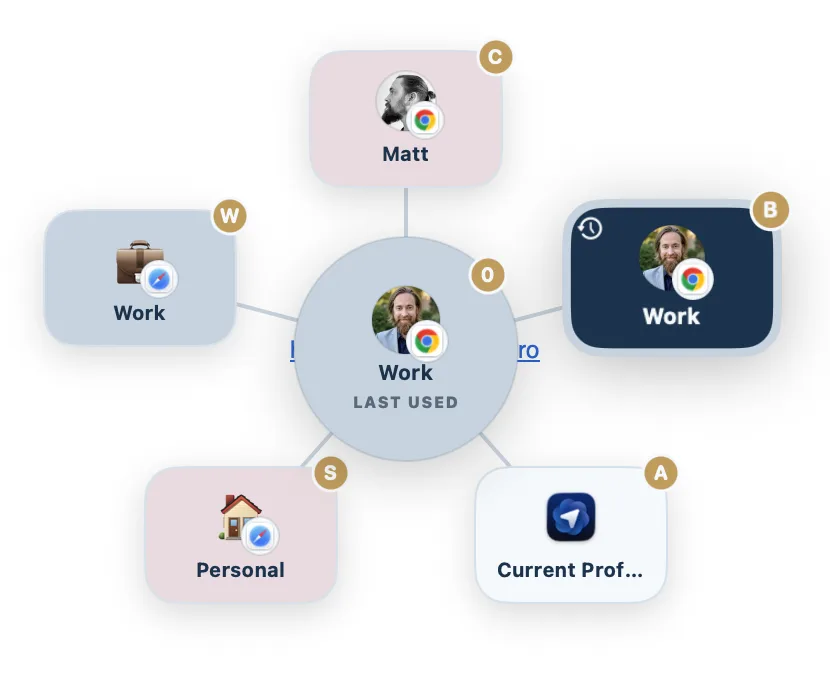
The quick take: Bumpr is a $2.99 Mac App Store picker that handles both web and email links, with per-domain rules and browser extensions, so it is the pick if routing mailto links matters to you. Burly is free and profile first: it chooses between browser profiles, Safari profiles included, with a radial picker, per-profile keys, and a global hotkey for every profile. The dividing line is profiles, Bumpr picks apps and Burly picks profiles.
Burly vs. Bumpr, feature by feature
| Feature | Burly | Bumpr |
|---|---|---|
| Price | Free | $2.99 one-time |
| Opens links in a specific browser profile | ✓ | ✗ |
| Targets Safari profiles | ✓ | ✗ |
| Routes email (mailto) links to your choice of app | ✗ | ✓ |
| Per-domain rules | ✗ | ✓ |
| Browser extensions for right-click routing | ✗ | ✓ |
| Picker at your cursor | Radial, under the cursor | Popup under the cursor |
| Keyboard shortcuts | ✓ | ✓ |
| Per-profile keyboard shortcuts | ✓ | ✗ |
| Global hotkey to open a profile (no link needed) | ✓ | ✗ |
| Per-profile emoji, account photo, and color | ✓ | ✗ |
| Fully local, no account | ✓ | ✓ |
| Native macOS app | ✓ | ✓ |
Features checked against the Bumpr site as of September 2026 (latest release 1.4.5 on October 4, 2026). Bumpr lists at $2.99 one-time on the Mac App Store.
Where Bumpr is the better pick
- Bumpr routes email too. Click a mailto link and it lets you choose the email client, or send it straight to Gmail in the browser you pick.
- It supports per-domain rules, so chosen hosts can always open in a chosen browser with no picker in the way.
- Its browser extensions for Safari, Chrome, Firefox, Opera, and Edge let you right-click or shift-click a link to route it from inside the browser.
- At $2.99 on the Mac App Store it is mature, inexpensive, and easy to install and trust.
The verdict
Bumpr is a great, inexpensive pick if you want one tidy app to route both web and email links, with per-domain rules as a bonus. Choose Burly if you need to reach a specific browser profile, Work versus Personal Chrome, or a Safari profile, which Bumpr cannot do. Burly is free, native, and treats every profile as a first class destination, with a radial picker, per-profile keys, and a global hotkey for every profile.
Other Bumpr alternatives
Looking at Bumpr alternatives in the plural, the first question is whether you need profiles or just a different picker. Burly is the free profile-aware picker, and the only free one still maintained. Browserosaurus was the other free browser-level picker, but it retired in 2025. If you would rather links routed silently, Velja ($8) and Choosy ($10) both add per-host rules, and Velja can open links in native apps the way Bumpr opens mail in your mail client. OpenIn ($11.99) is the broadest, covering links, mail, files, and phone numbers in one utility. Here is the shortlist.
- Velja · $8 one-time
A polished $8 router from Sindre Sorhus, built around per-host and per-app rules. - Choosy · $10 one-time
The deepest rules engine of the bunch, at $10, with Share menu, Handoff, and AirDrop routing. - Finicky · Free, open source
Free and open source, driven by a JavaScript config file rather than a picker. - Browserosaurus · Free, open source
A free, open-source browser picker that was retired in 2025 and is no longer maintained. - OpenIn · $11.99 one-time
An $11.99 route-everything utility covering links, mail, files, and phone numbers. - BrowserFairy · Free; Pro $8.99/yr
A rules-first launcher with Chromium and Firefox profiles on Pro, and no Safari profiles. - Open Link Pro · Free; Pro $19.99 lifetime
A paid browser picker with regex rules, tracker stripping, and link history, but no profiles listed.
Want them side by side instead? The comparison hub puts every macOS link router in one table, and the Mac link router guide explains what these apps do and how to set one up.
Bumpr alternatives: common questions
- Is there a free Bumpr alternative?
- Burly is free, native, and maintained, and it goes a level deeper than Bumpr by routing to a specific browser profile rather than a browser. Finicky is free too, but it replaces the picker with a JavaScript config file. Browserosaurus was the other free picker and is no longer maintained.
- Can Bumpr open a link in a specific browser profile?
- No. Bumpr picks between installed browsers and mail apps, so it can send a link to Chrome but not to your work profile inside Chrome, and it cannot target a Safari profile. That is the single biggest difference between it and Burly.
- Can I keep Bumpr for email links and use Burly for web links?
- Yes. macOS keeps the default web browser and the default mail client as separate settings, so you can set Burly as the default browser and leave Bumpr as the handler for mailto links. Burly does not route mail at all, so nothing overlaps.
Try Burly free
Native, private, and free. Route every link to the right browser profile in seconds. No account required.
Download for macOS