
Burly vs. BrowserFairy
A free BrowserFairy alternative that also reaches Safari profiles
BrowserFairy is a polished rules-first router, but its profile support is a paid Pro feature and stops short of Safari. If you want every profile, Safari profiles included, for free and without writing rules, Burly is the alternative to try.
By Matt Senter, who builds Burly
Matt Senter is an independent Mac developer who designs, builds, and ships small native apps end to end. He built Burly to send every link on his own Mac to the right browser profile, including Safari profiles that other routers cannot reach, and he writes these pages from that first-hand use.
BrowserFairy and its closest alternatives at a glance
| App | Price | Browser profiles | Safari profiles | Picker |
|---|---|---|---|---|
| Burly | Free | ✓ | ✓ | Radial, under the cursor |
| BrowserFairyBrowserFairy site ↗ | Free; Pro $8.99/yr | Chromium and Firefox, Pro only | ✗ | Keyboard launcher panel |
| VeljaVelja site ↗ | $8 one-time | Chromium and Firefox | ✗ | List popup |
| ChoosyChoosy site ↗ | $10 one-time | Chromium only | ✗ | Menu or list |
| FinickyFinicky site ↗ | Free | Chrome and Firefox | ✗ | No picker (config only) |
Why people switch from BrowserFairy
BrowserFairy is capable and well kept, so people rarely leave it because it broke. They leave over two limits. Profile routing, the feature that sends a link to Work Chrome rather than just Chrome, sits on the Pro tier, which is a subscription. And Safari profiles are out of reach entirely: the developer documents that a rule pointed at Safari simply opens Safari. If your day is split across Safari profiles, or you do not want a subscription for profile routing, Burly covers both for free.
Is Burly a good BrowserFairy alternative?
Most people comparing BrowserFairy alternatives want one of two things: profile routing without a subscription, or a way into Safari profiles. BrowserFairy gates the first behind Pro and, by its own documentation, cannot do the second, because a rule that targets Safari always opens plain Safari. Burly does both for free. What you give up is BrowserFairy's rule list, which can route a link silently by domain, wildcard, or source app, and its browser extensions for handing a tab to another browser.
How to switch from BrowserFairy to Burly
- Download Burly and drag it to Applications.
- Set Burly as your default web browser in System Settings, under Desktop & Dock, in place of BrowserFairy.
- Burly reads your browsers and every profile inside them, Safari profiles included, so there is no profile list to rebuild.
- Your BrowserFairy rules do not carry over. If a handful of them sent nearly everything to one profile, pin that profile under What to open instead.
What you give up
Rules are the real loss. BrowserFairy can route a link with no prompt at all by matching its domain, a wildcard, or the app it came from, and Burly has no per-link conditions: its only automatic path is one pinned profile for every link until you hold a key. You also lose BrowserFairy's browser extensions and its Command-Option-B launcher. If your routing is mostly rules you trust, stay with BrowserFairy.
BrowserFairy (BrowserFairy 2, by venqoo GmbH) is a long-running, actively maintained browser chooser on the Mac App Store. It lives in the menu bar, opens a keyboard launcher on Command-Option-B, and routes links by exact domain, wildcard pattern, or source app, first match wins. It can open a specific profile in Chrome, Firefox, Brave, Edge, Helium, and Opera, but profile routing and unlimited rules need Pro, and its own documentation says Safari profiles are not supported. The free tier includes three rules; Pro is $0.99 a month or $8.99 a year.
Burly vs. BrowserFairy: the quick take
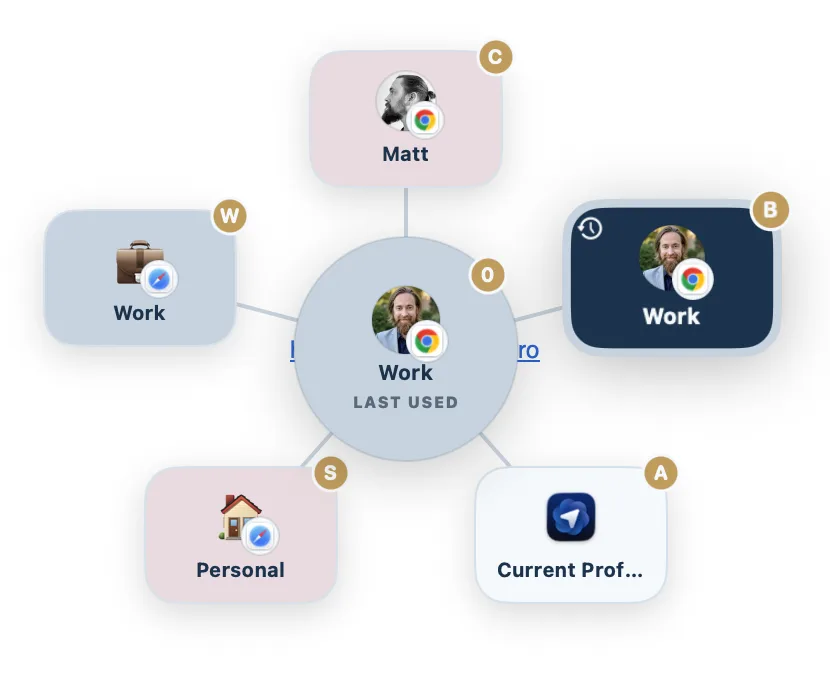
The quick take: BrowserFairy is the pick if you want links to route themselves by rule, with a keyboard launcher for the rest, and you only need Chromium and Firefox profiles. Burly is the pick if you would rather choose at click time from a radial picker, want Safari profiles as destinations, and do not want to pay for profile support.
Burly vs. BrowserFairy, feature by feature
| Feature | Burly | BrowserFairy |
|---|---|---|
| Price | Free | Free; Pro $8.99/yr |
| Opens links in a specific browser profile | ✓ | Chromium and Firefox, Pro only |
| Targets Safari profiles | ✓ | ✗ |
| Picker at your cursor | Radial, under the cursor | Keyboard launcher panel |
| Rules by domain, wildcard, and source app | ✗ | 3 free, unlimited on Pro |
| Browser extensions to hand a tab to another browser | ✗ | ✓ |
| Per-profile keyboard shortcuts | ✓ | Number keys in the launcher |
| Global hotkey to open a profile (no link needed) | ✓ | One hotkey opens the launcher |
| Per-profile emoji, account photo, and color | ✓ | Uses browser profile names and colors |
| Native macOS app | ✓ | ✓ |
Features checked against the BrowserFairy site as of September 2026. BrowserFairy lists at Free; Pro $8.99/yr on the Mac App Store.
Where BrowserFairy is the better pick
- BrowserFairy routes by rule: exact domains, wildcard patterns, and the app a link came from, so most links never need a prompt.
- Its browser extensions for Safari, Chrome, Firefox, and Edge hand the current tab to another browser in one click.
- It reaches profiles in Helium and Firefox as well as Chromium browsers, and has a long track record on the Mac App Store.
The verdict
BrowserFairy is a strong choice if you want rule-based routing with a keyboard launcher and your profiles all live in Chromium browsers or Firefox, and the Pro subscription is fine by you. Burly is the choice if you want every profile, Safari profiles included, as a destination for free, picked at click time rather than matched by rules.
Other BrowserFairy alternatives
Shopping for BrowserFairy alternatives in the plural usually means deciding how much of the rule list you want to keep. Velja ($8) and Choosy ($10) are the one-time-purchase rule engines, both profile-aware for Chromium browsers and both blind to Safari profiles, like BrowserFairy. Finicky keeps the rules and drops the price by moving them into a JavaScript file. OpenIn ($11.99) is the paid option that keeps rules and reaches Safari profiles. Burly drops the rules and asks at click time, for free. Here is the shortlist.
- Velja · $8 one-time
A polished $8 router from Sindre Sorhus, built around per-host and per-app rules. - Choosy · $10 one-time
The deepest rules engine of the bunch, at $10, with Share menu, Handoff, and AirDrop routing. - Finicky · Free, open source
Free and open source, driven by a JavaScript config file rather than a picker. - Browserosaurus · Free, open source
A free, open-source browser picker that was retired in 2025 and is no longer maintained. - Bumpr · $2.99 one-time
A $2.99 picker that chooses between browsers and mail clients, but not between profiles. - OpenIn · $11.99 one-time
An $11.99 route-everything utility covering links, mail, files, and phone numbers. - Open Link Pro · Free; Pro $19.99 lifetime
A paid browser picker with regex rules, tracker stripping, and link history, but no profiles listed.
Want them side by side instead? The comparison hub puts every macOS link router in one table, and the Mac link router guide explains what these apps do and how to set one up.
BrowserFairy alternatives: common questions
- Can BrowserFairy open links in a Safari profile?
- No. BrowserFairy's own documentation says Safari does not support profiles in its app, so a rule that targets Safari always opens Safari directly, in whichever profile Safari picks. Burly and OpenIn are the two routers that can send a link to a named Safari profile.
- Is browser profile routing free in BrowserFairy?
- No. BrowserFairy's free tier includes three rules, and browser profile support is listed as a Pro feature, at $0.99 a month or $8.99 a year on the Mac App Store. Burly routes to every browser profile, Safari profiles included, at no cost.
- Does Burly have rules like BrowserFairy?
- No. Burly asks at click time with a radial picker instead of matching domains or source apps. Its one automatic option is a pinned destination: turn on Invert with a profile under What to open, and every link goes there until you hold a key to choose.
Try Burly free
Native, private, and free. Route every link to the right browser profile in seconds. No account required.
Download for macOS