
Burly vs. Browserosaurus
A maintained Browserosaurus alternative that knows your profiles
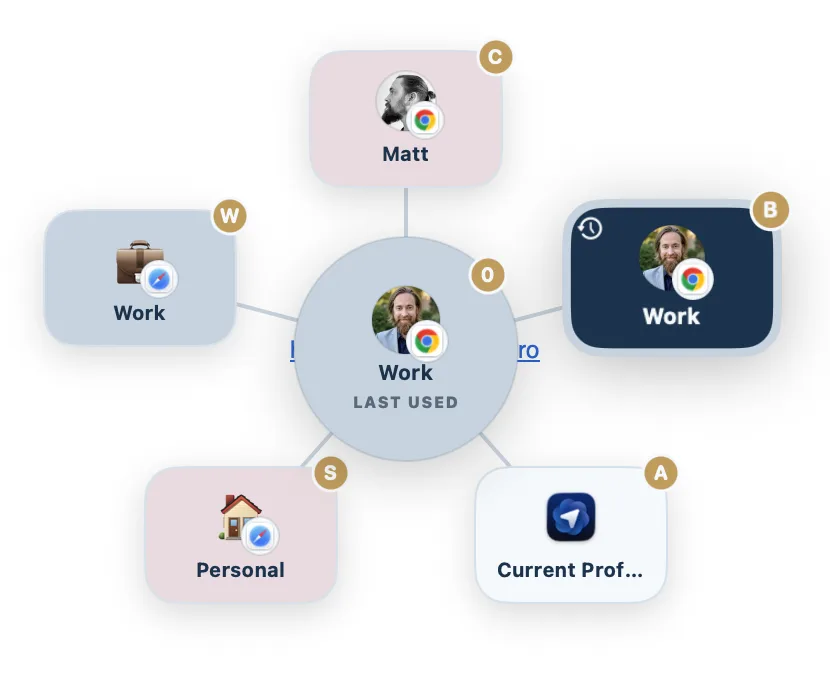
Browserosaurus was a friendly, free, open source browser picker, but it was retired in 2025, and it picked browsers, not profiles. If you need a maintained app that routes to a specific profile, Work Chrome versus Personal Chrome, or a Safari profile, Burly is the free, native alternative to try.
By Matt Senter, who builds Burly
Matt Senter is an independent Mac developer who designs, builds, and ships small native apps end to end. He built Burly to send every link on his own Mac to the right browser profile, including Safari profiles that other routers cannot reach, and he writes these pages from that first-hand use.
Browserosaurus and its closest alternatives at a glance
| App | Price | Browser profiles | Safari profiles | Picker |
|---|---|---|---|---|
| Burly | Free | ✓ | ✓ | Radial, under the cursor |
| BrowserosaurusBrowserosaurus site ↗ | Free | ✗ | ✗ | Grid popup |
| BumprBumpr site ↗ | $2.99 one-time | ✗ | ✗ | Popup under the cursor |
| FinickyFinicky site ↗ | Free | Chrome and Firefox | ✗ | No picker (config only) |
| VeljaVelja site ↗ | $8 one-time | Chromium and Firefox | ✗ | List popup |
Why people switch from Browserosaurus
This one is simpler than the others: Browserosaurus was retired in 2025, so the question is not really whether to switch but what to switch to. It was also a browser picker rather than a profile picker, which means it could send a link to Chrome but never to the right Chrome profile. Burly is actively maintained, native rather than Electron, and profile-aware, so it covers both the maintenance gap and a capability Browserosaurus never had.
Is Burly a good Browserosaurus alternative?
If you are after a Browserosaurus alternative, there are now two reasons. It was retired in 2025 and its repository is archived, so it no longer gets updates, and even while it was active it could only pick between browsers, not profiles. Browserosaurus was a lovely, free grid picker, but it could not tell Work Chrome from Personal Chrome, and it had no concept of Safari profiles. Burly is the natural step up: it is also free, but it is actively maintained, makes each profile a destination, runs as a native app rather than Electron, and adds per-profile emoji, colors, and hotkeys.
How to switch from Browserosaurus to Burly
- Download Burly and drag it to Applications.
- Set Burly as your default web browser in System Settings, under Desktop & Dock, replacing Browserosaurus.
- Burly picks up your browsers and, unlike Browserosaurus, every profile inside them.
- Move your muscle memory over: assign each profile the key you were already reaching for.
What you give up
The honest loss is openness. Browserosaurus was open source and auditable, and Burly is not, so if running only inspectable software is a hard requirement, Burly will not satisfy it and Finicky is the closer fit. Beyond that there is little to weigh: an unmaintained app on a moving OS target gets worse on its own.
Browserosaurus was a free, open source browser picker for macOS. Click a link and it popped up a grid of your installed browsers, each on a keyboard shortcut, so you could choose where the link opened. It was simple and friendly, but it chose browsers, not profiles, so it could not tell your Work Chrome from your Personal Chrome, and it was built on Electron rather than native code. Its developer retired the project in 2025, and the repository is now archived and no longer maintained.
Burly vs. Browserosaurus: the quick take
The quick take: both are free, and Browserosaurus was open source with a friendly grid picker, but it was retired in 2025 and is no longer maintained. The dividing line is profiles. Browserosaurus chose browsers; Burly chooses profiles, Safari profiles included, stays native rather than Electron, and keeps shipping updates. If one browser holds two profiles you need to keep apart, Burly is the one that can tell them apart, and the one still being maintained.
Burly vs. Browserosaurus, feature by feature
| Feature | Burly | Browserosaurus |
|---|---|---|
| Price | Free | Free |
| Open source | ✗ | ✓ |
| Actively maintained | ✓ | Retired in 2025 |
| Picker at your cursor | Radial, under the cursor | Grid popup |
| Keyboard shortcuts | ✓ | ✓ |
| Opens links in a specific browser profile | ✓ | ✗ |
| Targets Safari profiles | ✓ | ✗ |
| Per-profile emoji, account photo, and color | ✓ | ✗ |
| Global hotkey to open a profile (no link needed) | ✓ | ✗ |
| Modifier-key bypass and routing modes | ✓ | ✗ |
| Native macOS app (not Electron) | ✓ | ✗ |
Features checked against the Browserosaurus site as of September 2026 (latest release 20.12.0 on October 4, 2026). Browserosaurus lists at Free, open source on the Browserosaurus site.
Where Browserosaurus is the better pick
- Browserosaurus was free and open source, and its source remains available to read and fork even after the archive.
- If you only juggle browsers and never profiles, it did that one job simply and well.
- As an archived project it is now stable and unchanging, with no telemetry and no surprises, though also no fixes.
The verdict
Browserosaurus was a lovely free pick if you only needed to choose between browsers, but it was retired in 2025 and is no longer maintained. The moment one browser holds two profiles, Work and Personal Chrome, or two Safari profiles, it could not tell them apart. Burly makes each profile a first class destination, Safari profiles included, stays native rather than Electron, is actively maintained, and adds per-profile keys, a modifier bypass, and global hotkeys.
Other Browserosaurus alternatives
Because Browserosaurus is retired rather than merely disliked, everyone leaving it is shopping for alternatives in the plural, and the honest answer is that several are worth a look. Burly is the closest in spirit: free, a picker under your cursor, keys on every option, and no configuration, but it chooses profiles rather than browsers. Bumpr, at $2.99, is the nearest match to what Browserosaurus actually did, a maintained popup that picks between whole browsers and mail apps. Finicky is the free, open-source choice if you would rather write rules than click, and it is the only remaining option that satisfies an open-source requirement. Velja, Choosy, and OpenIn are the paid routers if you want automation. Here is the shortlist.
- Velja · $8 one-time
A polished $8 router from Sindre Sorhus, built around per-host and per-app rules. - Choosy · $10 one-time
The deepest rules engine of the bunch, at $10, with Share menu, Handoff, and AirDrop routing. - Finicky · Free, open source
Free and open source, driven by a JavaScript config file rather than a picker. - Bumpr · $2.99 one-time
A $2.99 picker that chooses between browsers and mail clients, but not between profiles. - OpenIn · $11.99 one-time
An $11.99 route-everything utility covering links, mail, files, and phone numbers. - BrowserFairy · Free; Pro $8.99/yr
A rules-first launcher with Chromium and Firefox profiles on Pro, and no Safari profiles. - Open Link Pro · Free; Pro $19.99 lifetime
A paid browser picker with regex rules, tracker stripping, and link history, but no profiles listed.
Want them side by side instead? The comparison hub puts every macOS link router in one table, and the Mac link router guide explains what these apps do and how to set one up.
Browserosaurus alternatives: common questions
- Is Browserosaurus still maintained?
- No. Its developer retired the project in 2025 and the repository is archived, so there are no further releases or macOS compatibility fixes. The source stays readable and forkable, but a link handler that stops tracking macOS changes is a poor bet for something that sits in the path of every link you click.
- What is the best Browserosaurus replacement in 2026?
- It depends on whether you need profiles. If a single browser holds both your work and personal profiles, Burly is the replacement: free, native, maintained, and profile-aware, Safari profiles included. If you only ever switch between whole browsers and want the same popup-of-browsers behaviour, Bumpr does that for $2.99. If open source is non-negotiable, Finicky is the maintained option, at the cost of writing a config file.
- Could Browserosaurus open a specific Chrome profile?
- No. It listed installed browsers, not the profiles inside them, so it could send a link to Chrome but never to Work Chrome specifically, and it had no concept of Safari profiles. That limit is why most people leaving it go to a profile-aware router rather than another browser picker.
Try Burly free
Native, private, and free. Route every link to the right browser profile in seconds. No account required.
Download for macOS