
Give Every Browser Profile an Emoji, a Color, and a Hotkey
In a Mac link router like Burly, each profile can carry an emoji or account photo, a color tint, and its own hotkey. Those three cues turn a list of similar Chrome and Safari names into faces you recognize, and a keystroke that opens the right profile without looking.
By Matt Senter, who builds Burly · · 4 min read
Matt Senter is an independent Mac developer who designs, builds, and ships small native apps end to end. He built Burly to send every link on his own Mac to the right browser profile, including Safari profiles that other routers cannot reach, and he writes these pages from that first-hand use.
Once you keep more than two or three browser profiles, a new problem shows up: they all look the same. Work, Personal, a client project, a side hustle, each one is just another row that says "Chrome" with a slightly different name you have to stop and read. The whole point of profiles is to keep contexts apart, but if you cannot tell them apart at a glance, you are still doing the work in your head. A link router that can show those cues at click time is what makes the separation usable.
Burly leans on three small customizations to fix that. Every profile can carry an emoji, a color, and a hotkey. None of them change what a profile is, they just make it instant to spot and instant to reach.
An emoji gives each profile a face
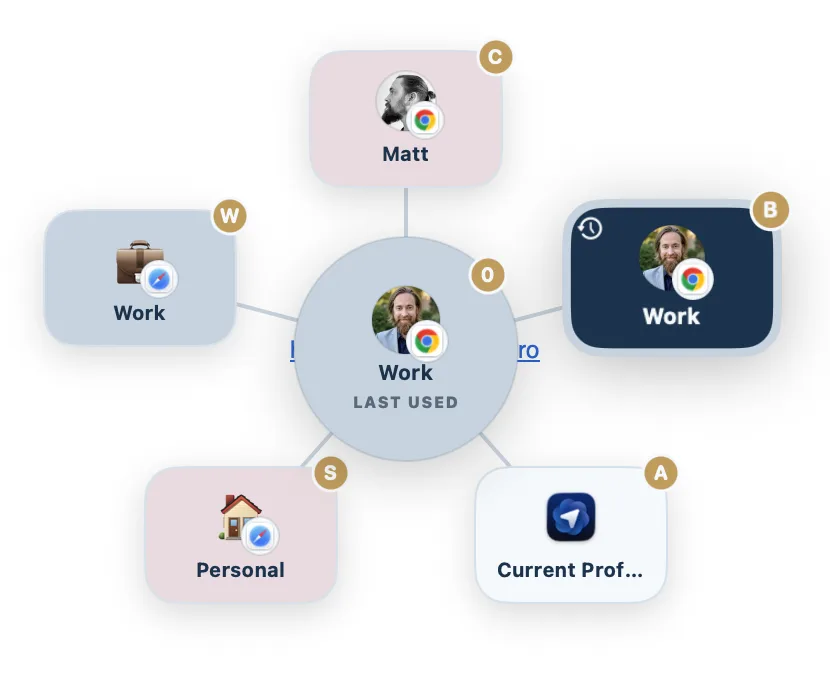
When you click a link, Burly shows a quick picker of your profiles. Names alone make you read; a symbol makes you recognize. So each profile can take an emoji, and that emoji rides along everywhere the profile appears.
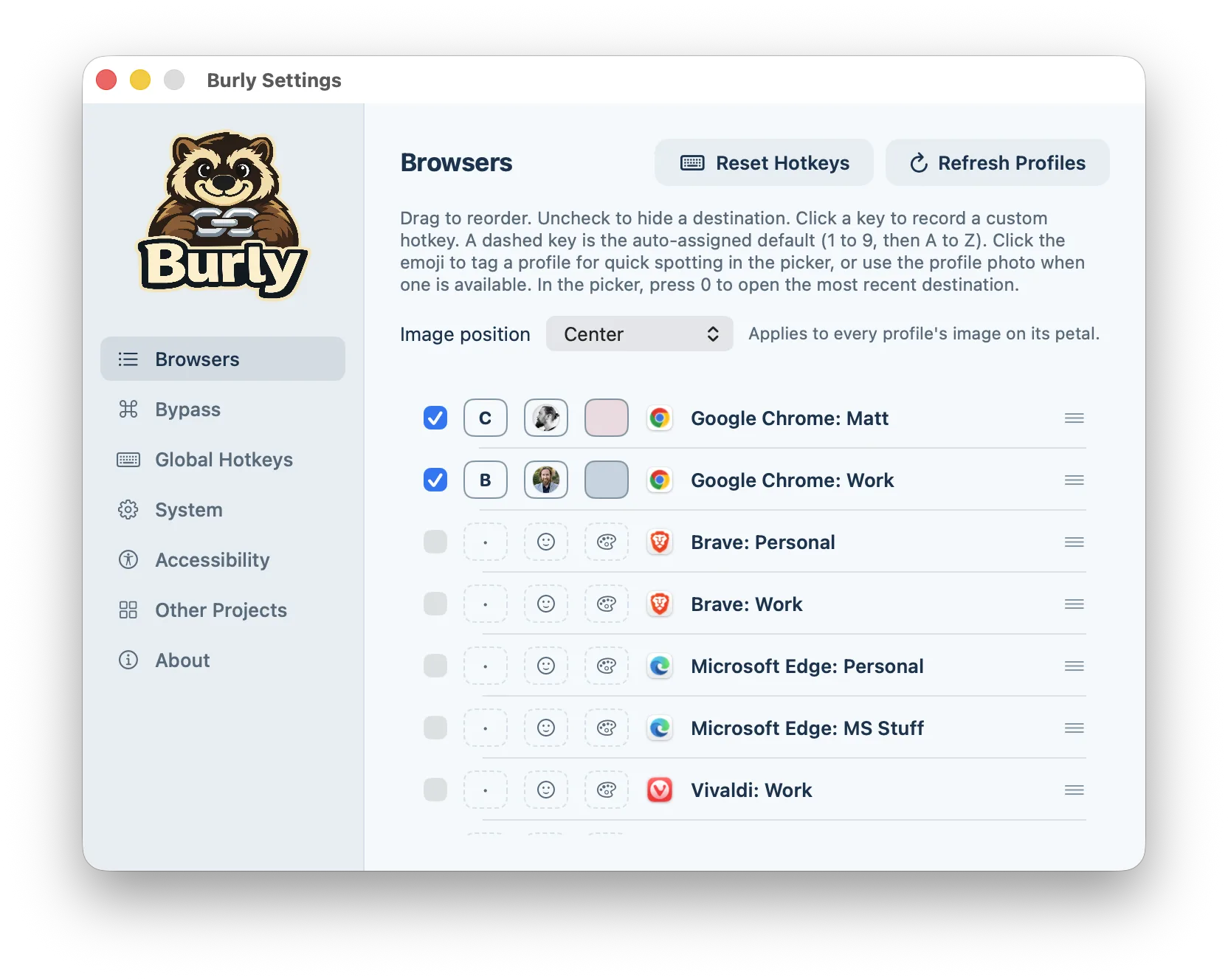
Setting one is fast. Open Settings, find the profile, and click the emoji button on its row. You get a popover of curated suggestions for the usual contexts, a briefcase for work, a house for home, a laptop for development, a game controller for the fun profile, plus a search box if you want something specific and a paste field for any emoji at all. Chromium profiles that are signed into an account can also borrow their existing account photo, so you can match what you already see inside Chrome.
The result is that the picker stops being a list of words and becomes a row of faces. You aim for the briefcase, not for the third item down.
A color makes it pop
Color does the same job from across the screen. Each profile can take a background tint from a small curated palette, soft ice, glacier mint, warm sand, arctic rose, and a few more, all chosen to sit nicely against Burly's frosted look without screaming for attention.
Click the color swatch on a profile row and pick a tint, or leave it on the default frost surface. The idea is not a rainbow, it is a quiet code: Work is always the cool blue one, Personal is always the warm one. After a day or two your hand knows where to go before your eyes have finished reading.
Emoji and color stack, so a profile can be both the briefcase and the blue. Two signals are easier to catch in a fraction of a second than one.
A hotkey skips the picker entirely
Recognizing a profile faster is good. Not having to look at all is better. That is what the per-profile hotkey is for.
Each profile can be assigned a key, and Burly auto-fills them in order, 1 through 9 and then the letters, so you always have a default to start from. Press the global prefix plus that key from anywhere on your Mac and the profile opens straight to a fresh tab, no picker, no link required. The default prefix is the Hyper combo, Control-Option-Shift-Command, which nothing else on macOS claims, so your shortcuts never collide with the system or another app. If you prefer a shorter chord, you can switch the prefix in Settings.
There is one reserved shortcut worth memorizing: the prefix plus 0 always opens your most recently used destination. When you are bouncing between two profiles all day, that single keystroke becomes the one you reach for without thinking.
Small touches, real speed
None of this is decoration for its own sake. An emoji and a color cut the time it takes to find the right profile in the picker, and a hotkey removes the picker from the loop altogether for the profiles you live in. Set them once in Settings, where all three controls sit on a single row per profile, and the choosing-a-profile step fades into muscle memory.
That is the whole aim of Burly: get every link to the profile where it belongs, with as little thinking as possible. Making your profiles easy to see and easy to reach is a big part of how it gets out of your way.
Try Burly free
Route every link to the right browser profile in seconds. Native, private, and free. No account required.
Download for macOS